
State 01 - not connected
Your integration is not active yet
To integrate and get API keys, specify your website in the widget settings.
A B2B dashboard ecosystem for catalog management, 3D model production, website integration, billing, account setup and admin operations behind 3D Viewer and Virtual Try-on.
A B2B dashboard ecosystem for catalog management, 3D model production, website integration, billing, account setup and admin operations behind 3D Viewer and Virtual Try-on.
A B2B dashboard ecosystem for catalog management, 3D model production, website integration, billing, account setup and admin operations behind 3D Viewer and Virtual Try-on.
Demo Conversion
~80%
Demo Conversion
~80%
Demo Conversion
~80%
Clients Retention
~90%+
Clients Retention
~90%+
Clients Retention
~90%+
Onboarding Efficiency
↓ 40% drop-off
Onboarding Efficiency
↓ 40% drop-off
Onboarding Efficiency
↓ 40% drop-off

The operational layer has to connect premium customer-facing AR with very practical back-office work: product data, source files, GLB delivery, activation keys, domains, license usage and billing.
The operational layer has to connect premium customer-facing AR with very practical back-office work: product data, source files, GLB delivery, activation keys, domains, license usage and billing.
The operational layer has to connect premium customer-facing AR with very practical back-office work: product data, source files, GLB delivery, activation keys, domains, license usage and billing.
The AR promise depends on many hidden steps
A product is not ready when it is added. It needs media, a 3D model, approval, integration and a live widget state.
Turn operational complexity into a system
The interface needed shared status language, compact data density and workflows that guide users without hiding power actions.
A dashboard that works as a control room
Analytics, catalog readiness, activation and admin operations are connected instead of presented as isolated pages.
The AR promise depends on many hidden steps
A product is not ready when it is added. It needs media, a 3D model, approval, integration and a live widget state.
Turn operational complexity into a system
The interface needed shared status language, compact data density and workflows that guide users without hiding power actions.
A dashboard that works as a control room
Analytics, catalog readiness, activation and admin operations are connected instead of presented as isolated pages.
The dashboard is organized around the core jobs of a 3D commerce platform: monitoring readiness, managing catalog production, activating integrations, and supporting account operations.
The dashboard is organized around the core jobs of a 3D commerce platform: monitoring readiness, managing catalog production, activating integrations, and supporting account operations.
The dashboard is organized around the core jobs of a 3D commerce platform: monitoring readiness, managing catalog production, activating integrations, and supporting account operations.
Control room for catalog size, model readiness, license capacity, Try-on activity and Viewer activity.
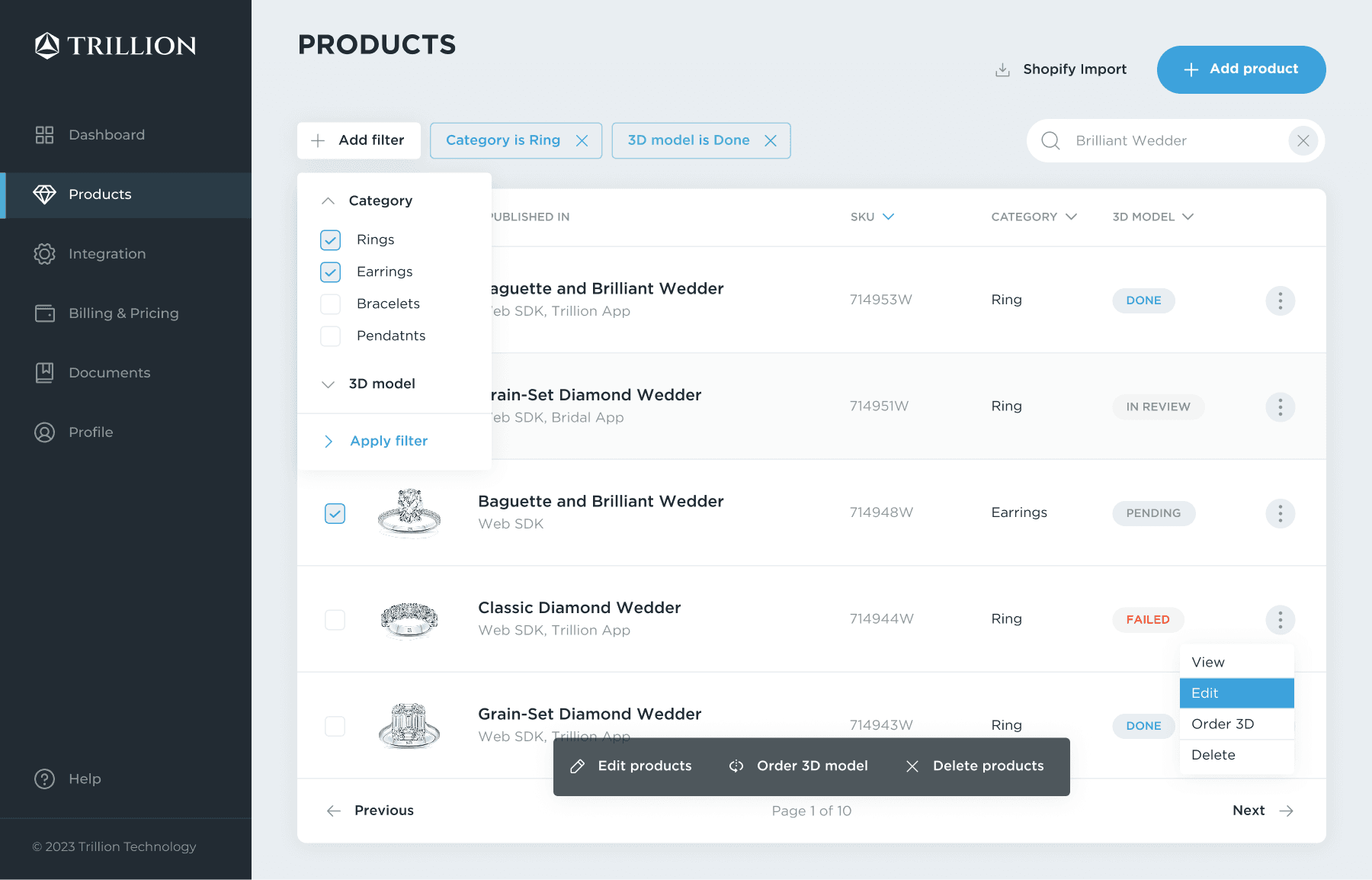
High-density SKU table and product detail flow where catalog work becomes 3D production.
First-run checklist that guides teams from account setup to the first live AR experience.
Activation key, approved hostnames, empty states and platform help for widget launch.
Plan packaging, engagement usage, ordered models, validity period and billing history.
Personal data, company data, logo upload, security settings and responsive account states.
Customer overview, tariff context, integration status and internal 3D modeling workflow.
Sign in, registration, verification, recovery and expired-link states for account entry.
Control room for catalog size, model readiness, license capacity, Try-on activity and Viewer activity.
High-density SKU table and product detail flow where catalog work becomes 3D production.
First-run checklist that guides teams from account setup to the first live AR experience.
Activation key, approved hostnames, empty states and platform help for widget launch.
Plan packaging, engagement usage, ordered models, validity period and billing history.
Personal data, company data, logo upload, security settings and responsive account states.
Customer overview, tariff context, integration status and internal 3D modeling workflow.
Sign in, registration, verification, recovery and expired-link states for account entry.
Control room for catalog size, model readiness, license capacity, Try-on activity and Viewer activity.
High-density SKU table and product detail flow where catalog work becomes 3D production.
First-run checklist that guides teams from account setup to the first live AR experience.
Activation key, approved hostnames, empty states and platform help for widget launch.
Plan packaging, engagement usage, ordered models, validity period and billing history.
Personal data, company data, logo upload, security settings and responsive account states.
Customer overview, tariff context, integration status and internal 3D modeling workflow.
Sign in, registration, verification, recovery and expired-link states for account entry.
3D Viewer and Try-on are the visible customer experience, but the dashboard has to manage the preparation, publishing and measurement behind them.
3D Viewer and Try-on are the visible customer experience, but the dashboard has to manage the preparation, publishing and measurement behind them.
3D Viewer and Try-on are the visible customer experience, but the dashboard has to manage the preparation, publishing and measurement behind them.
Materials & shaders
Materials & shaders
Tuned PBR parameters for gold, platinum, and gemstone surfaces to read correctly at thumbnail scale and inside the AR layer.
Tuned PBR parameters for gold, platinum, and gemstone surfaces to read correctly at thumbnail scale and inside the AR layer.
Environment & lighting
Environment & lighting
Specified HDRIs and ambient conditions that matched the Gaussian Splatting backgrounds in the try-on layer — so the jewelry didn't look pasted on.
Specified HDRIs and ambient conditions that matched the Gaussian Splatting backgrounds in the try-on layer — so the jewelry didn't look pasted on.
Viewer feature specs
Viewer feature specs
Wrote requirements for rotate, zoom, background switching, and AR launch — bridging design intent and Three.js implementation.
Wrote requirements for rotate, zoom, background switching, and AR launch — bridging design intent and Three.js implementation.
Try-on QA & strategy
Try-on QA & strategy
Participated in acceptance reviews and strategic planning for the Gaussian Splatting + MediaPipe pipeline with CV and ML engineering teams.
Participated in acceptance reviews and strategic planning for the Gaussian Splatting + MediaPipe pipeline with CV and ML engineering teams.
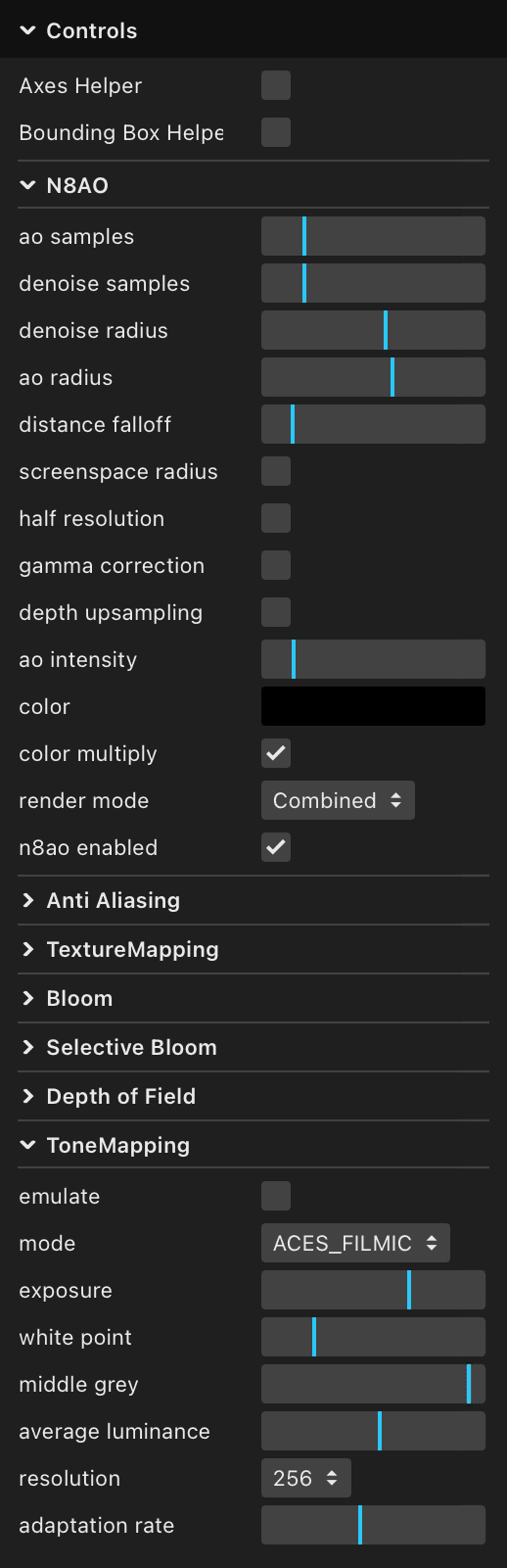
A compact sequence showing how the product moves from setup to use: onboarding introduces the workflow, while the Virtual Try-On demonstrates the experience in the product page context.
A compact sequence showing how the product moves from setup to use: onboarding introduces the workflow, while the Virtual Try-On demonstrates the experience in the product page context.
Instead of presenting every page as a separate chapter, the case focuses first on the places where daily operational logic is most visible: dashboard control and catalog production.
Instead of presenting every page as a separate chapter, the case focuses first on the places where daily operational logic is most visible: dashboard control and catalog production.
Instead of presenting every page as a separate chapter, the case focuses first on the places where daily operational logic is most visible: dashboard control and catalog production.
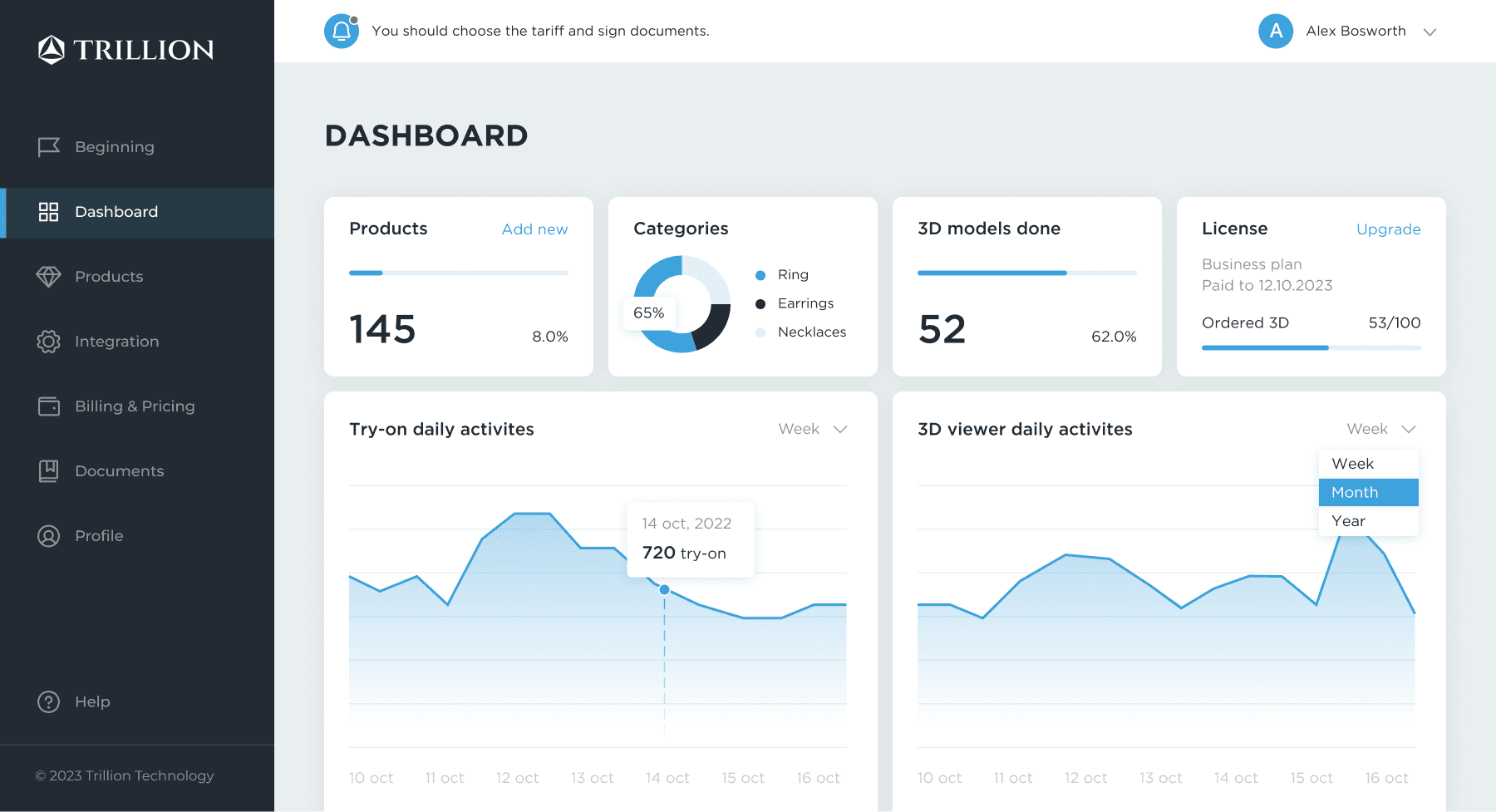
Each row combines product identity, channel context and 3D readiness, so operators can scan high-volume catalogs without opening every detail page.
Each row combines product identity, channel context and 3D readiness, so operators can scan high-volume catalogs without opening every detail page.
Each row combines product identity, channel context and 3D readiness, so operators can scan high-volume catalogs without opening every detail page.
Subscription management, 3D modeling services, and payment history are combined into a unified workflow, reducing context switching and making account administration part of the product experience.
Subscription management, 3D modeling services, and payment history are combined into a unified workflow, reducing context switching and making account administration part of the product experience.
Subscription management, 3D modeling services, and payment history are combined into a unified workflow, reducing context switching and making account administration part of the product experience.

State 01 - not connected
To integrate and get API keys, specify your website in the widget settings.
State 02 - connected
Activation key
Connected hostnames
localhost
Added - 12/08/2022
trillion.jewelry
Added - 14/08/2022
State 01 - not connected
To integrate and get API keys, specify your website in the widget settings.
State 02 - connected
Activation key
Connected hostnames
localhost
Added - 12/08/2022
trillion.jewelry
Added - 14/08/2022
Onboarding had to turn an empty cabinet into a sequence of concrete launch jobs. Instead of presenting setup as a long checklist, V2 framed each step as a small commitment with visible progress toward the first working try-on.
Onboarding had to turn an empty cabinet into a sequence of concrete launch jobs. Instead of presenting setup as a long checklist, V2 framed each step as a small commitment with visible progress toward the first working try-on.
Onboarding had to turn an empty cabinet into a sequence of concrete launch jobs. Instead of presenting setup as a long checklist, V2 framed each step as a small commitment with visible progress toward the first working try-on.
Greet the user by name, set context, and show only the first required action - not the full roadmap.
Getting started
Upload product photos, fill required fields, request a 3D model. One clear task with a visible finish line.
Getting started
Add hostname, copy the activation key, embed the widget. First successful try-on is the moment the product earns trust.
Getting started
Greet the user by name, set context, and show only the first required action - not the full roadmap.
Getting started
Upload product photos, fill required fields, request a 3D model. One clear task with a visible finish line.
Getting started
Add hostname, copy the activation key, embed the widget. First successful try-on is the moment the product earns trust.
Getting started
The sequence connects onboarding to activation: account setup creates context, product upload starts 3D production, and hostname/key setup turns the widget into a live storefront experience.
The sequence connects onboarding to activation: account setup creates context, product upload starts 3D production, and hostname/key setup turns the widget into a live storefront experience.
The sequence connects onboarding to activation: account setup creates context, product upload starts 3D production, and hostname/key setup turns the widget into a live storefront experience.
Product outcome
Trillion evolved into a clearer operating system for AR commerce: teams could monitor catalog readiness, manage 3D production, activate integrations, and evaluate viewer and try-on performance through a more consistent interface.
The work established a governed product system with clearer IA, reusable patterns, consistent states, and a higher fidelity bar for 3D commerce interactions.
Operational clarity
Dashboard, catalog, license, and engagement signals were structured around readiness, priority, and the next operational action.
Activation path
Onboarding and integration were shaped into a linear path with visible progress, focused setup tasks, and a clearer route to activation.
3D fidelity
Materials, lighting, preview states, and interaction specs became part of the design scope, giving the 3D experience a clearer role in product evaluation.
Product outcome
Trillion evolved into a clearer operating system for AR commerce: teams could monitor catalog readiness, manage 3D production, activate integrations, and evaluate viewer and try-on performance through a more consistent interface.
The work established a governed product system with clearer IA, reusable patterns, consistent states, and a higher fidelity bar for 3D commerce interactions.
Operational clarity
Dashboard, catalog, license, and engagement signals were structured around readiness, priority, and the next operational action.
Activation path
Onboarding and integration were shaped into a linear path with visible progress, focused setup tasks, and a clearer route to activation.
3D fidelity
Materials, lighting, preview states, and interaction specs became part of the design scope, giving the 3D experience a clearer role in product evaluation.
Product outcome
Trillion evolved into a clearer operating system for AR commerce: teams could monitor catalog readiness, manage 3D production, activate integrations, and evaluate viewer and try-on performance through a more consistent interface.
The work established a governed product system with clearer IA, reusable patterns, consistent states, and a higher fidelity bar for 3D commerce interactions.
Operational clarity
Dashboard, catalog, license, and engagement signals were structured around readiness, priority, and the next operational action.
Activation path
Onboarding and integration were shaped into a linear path with visible progress, focused setup tasks, and a clearer route to activation.
3D fidelity
Materials, lighting, preview states, and interaction specs became part of the design scope, giving the 3D experience a clearer role in product evaluation.
Available for product design work across web, mobile, and connected systems.